Plotting resource usage statistics
| updated
Using monitor
to generate CPU and memory use statistics for a process and its children:
monitor -i 100 -o /tmp/usage.tsv ebk-select -n
Here I am using ebk-select
with fzf as the selection command.
The Monitor output looks like this:
| Time | CPU | Threads | RSS | VMS | PID | Command | CmdLine |
|---|---|---|---|---|---|---|---|
| 0.10 | 0.00 | 6 | 3780608 | 1257824256 | 67015 | ebk-select | [“ebk-select” “-n”] |
| 0.12 | 0.00 | 10 | 8642560 | 1942224896 | 67021 | fzf | [“fzf” “–exact”] |
| 0.20 | 0.00 | 6 | 3780608 | 1257824256 | 67015 | ebk-select | [“ebk-select” “-n”] |
| 0.22 | 0.00 | 10 | 8642560 | 1942224896 | 67021 | fzf | [“fzf” “–exact”] |
Read the data into Python using Pandas:
import pandas as pd
data = pd.read_table("/tmp/usage.tsv")
Convert the memory measurements from bytes to megabytes:
data["RSS"] /= 1024 * 1024
data["VMS"] /= 1024 * 1024
Set up a figure for Matplotlib to plot to, with two subplots: one for CPU usage and one for memory:
import matplotlib.pyplot as plt
plt.style.use("bmh")
fig = plt.figure(figsize=(6, 6), layout="constrained")
mem, cpu = fig.subplots(nrows=2, sharex=True)
For each process in the table, plot the CPU usage against time:
grouped = data.groupby("Command")

for cmd, subset in grouped:
    cpu.plot("Time", "CPU%", "o-", data=subset, label=cmd)

cpu.set_xlabel("Time, s")
cpu.set_ylabel("CPU, %")
Plot the memory usage (RSS or VMS) against time in the other subplot. Since we have a shared x-axis, we don’t set an x label this time.
for cmd, subset in grouped:
    mem.plot("Time", "RSS", "o-", data=subset, label=cmd)

mem.set_ylabel("RSS memory, MiB")
mem.set_ylim(0)
Add the legend to one of the subplots (whichever has the most white space):
cpu.legend()
Then save the figure to file:
fig.savefig("/tmp/usage.svg", transparent=True)
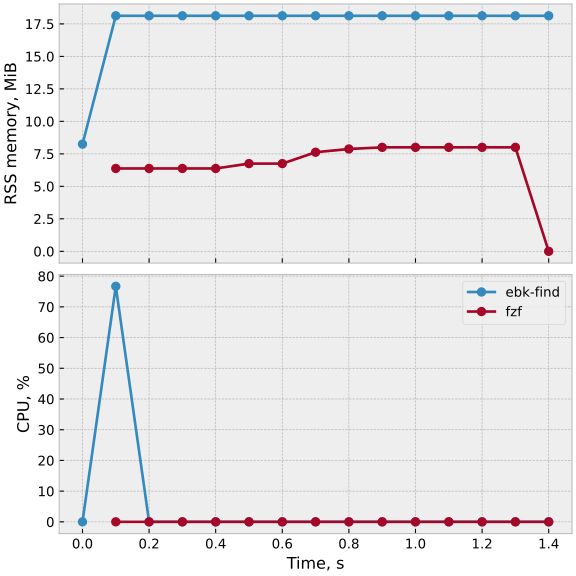
Here is the full script: plotting-monitor-output.py
[Package versions used: python 3.14.3, pandas 2.3.3, matplotlib 3.10.8]