Sequence diagrams using PlantUML
Recreating the diagrams described in Ch. 3 ‘Visualise application and user flows’ of Creating software with modern diagramming by Ashley Peacock, using PlantUML
See Software design diagrams using PlantUML for the other posts in the series.
These diagrams are generated using the -Smonochrome=true and -Sshadowing=false flags.
To model the interactions between different systems, use a sequence diagram with data flow represented as messages sent between nodes (lifelines).
Using actor, database, etc. instead of participant
changes the shape with which the node is represented.
The participants don’t have to be declared upfront, but this allows fixing the order in which they appear on the diagram.
- solid/dotted arrow means request/response
- solid arrowhead means synchronous call
@startuml
title User sign-up flow

actor Browser
participant "Sign-up service" as Signup
participant "User service" as User

Browser -> Signup : GET /sign_up
Signup --> Browser : 200 OK (HTML page)
@enduml
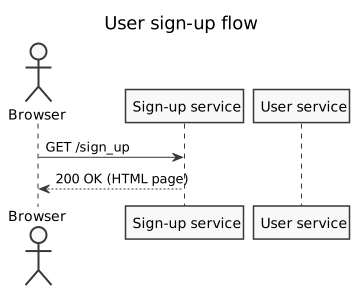
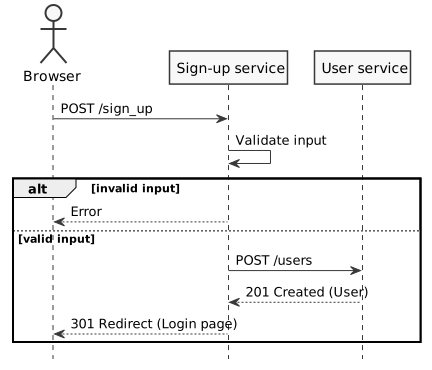
Alternative paths:
Use an alt/else/end group
to show branching logic (e.g. happy and unhappy path).
Browser -> Signup : POST /sign_up
Signup -> Signup : Validate input

alt invalid input
  Signup --> Browser : Error
else valid input
  Signup -> User : POST /users
  User --> Signup : 201 Created (User)
  Signup --> Browser : 301 Redirect (Login page)
end
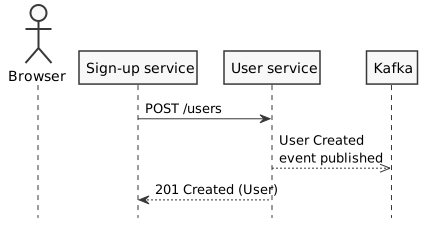
Asynchronous messages:
- dotted arrow with empty arrowhead means asynchronous call
Signup -> User : POST /users
User -->> Kafka : User Created\nevent published
User --> Signup : 201 Created (User)
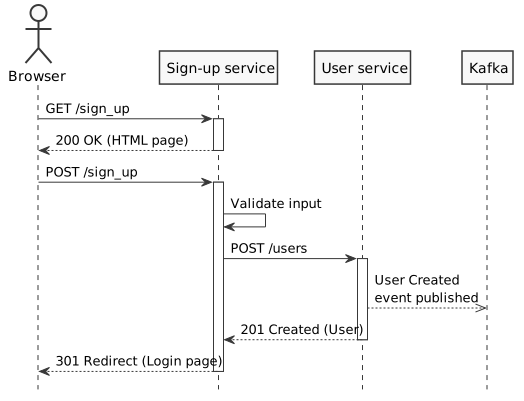
Lifeline activation can indicate how complex an interaction is by how many messages are passed before a node returns its response.
Manually activate and deactivate a node:
Browser -> Signup : GET /sign_up
activate Signup
Signup --> Browser : 200 OK (HTML page)
deactivate Signup
Shortcut using ++ and --:
Signup -> User ++ : POST /users
User -->> Kafka : User Created\nevent published
User --> Signup -- : 201 Created (User)
Or use return to deactivate the last node that is still activated:
Browser -> Signup ++ : POST /sign_up
/' ... '/
return 301 Redirect (Login page)
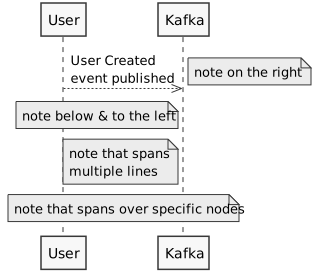
A note can be used to highlight or provide additional context.
User -->> Kafka : User Created\nevent published
note right : note on the right
note left of Kafka : note below & to the left
note left of Kafka
  note that spans
  multiple lines
end note
note over User, Kafka : note that spans over specific nodes
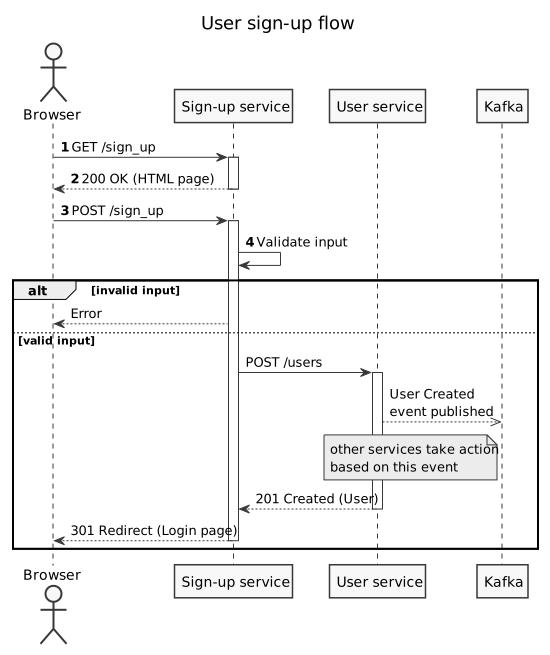
The full diagram specification (with autonumbering for the first few messages):
@startuml
title User sign-up flow

actor Browser
participant "Sign-up service" as Signup
participant "User service" as User
participant Kafka

autonumber

Browser -> Signup : GET /sign_up
activate Signup
Signup --> Browser : 200 OK (HTML page)
deactivate Signup

Browser -> Signup ++ : POST /sign_up
Signup -> Signup : Validate input

autonumber stop

alt invalid input
  Signup --> Browser : Error
else valid input
  Signup -> User ++ : POST /users

  User -->> Kafka : User Created\nevent published
  note left of Kafka
    other services take action
    based on this event
  end note

  User --> Signup -- : 201 Created (User)
  return 301 Redirect (Login page)
end
@enduml
Note: Unlike in Mermaid, it isn’t possible to add a menu with hyperlinks to a participant.